Product case study · From the idea to the finished platform · 2026

From a shared Drive folder to an internal operating system for a real estate team

TeamBrissette2026 is a private, bilingual web application that runs a brokerage team's day-to-day: a searchable document library, a 360° property hub, Facebook ad campaigns audited and built inside the app, a lead pipeline wired to the CRM, accounting per property, AI photo strategy, a video training studio and a full admin back office.

I framed the problem with the team, designed the system, built every screen and every integration, and kept the whole thing coherent as it grew — organisation, web development, orchestration and lead / business development in one seat.

TanStack Start v1 · React 19 · SSRTypeScript end to endTailwind CSS v4 · shadcn/uiPostgreSQL + Row Level SecurityCloudflare WorkersGemini vision & textBilingual EN / FR
76
route files in the app
48
database tables
225
typed server functions
59
database migrations
15
internal tools & calculators
48.8k
lines of TypeScript

Counts measured directly from the project source and schema.

Context

The problem

Everything the team produced existed — but nowhere in particular. The cost was not missing information; it was the time spent locating it and the impossibility of connecting effort to outcome.

Knowledge trapped in a shared drive

Forms, templates, processes, marketing assets, compliance files, logos and training material lived in one shared Google Drive. Finding a file meant remembering where someone else had filed it, and every new agent restarted that learning curve.

Work split across disconnected tools

Listings in a spreadsheet, ads on an external ad platform, leads in a CRM, property websites produced in a separate project, photos on a photographer's delivery portal. Nothing referenced anything else.

No shared view of effort vs. result

Nobody could answer "what did we invest on this property, and what did it produce?" without rebuilding the answer by hand from three exports.

Design goal

One interface where a resource is at most two clicks away, where a property carries all of its own work, and where the drive can eventually be switched off — files are copied into the platform's own storage rather than deep-linked out to it.

Product tour

The product, screen by screen

Screenshots captured from the running application. The interface is bilingual — labels follow the signed-in user's language.
/library
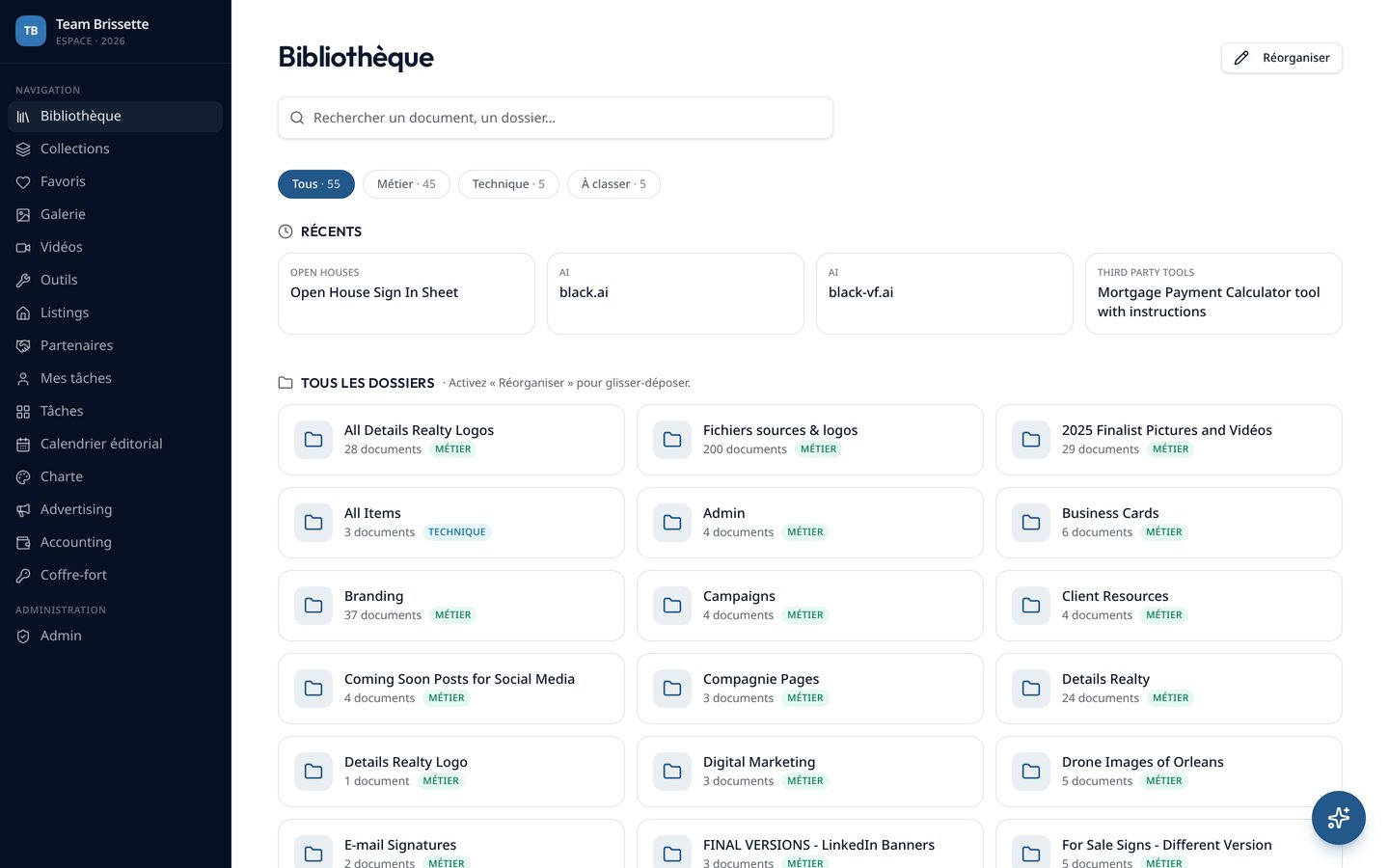
Library — folder-first navigation over the whole team archive, with instant fuzzy search, a Recents strip, business/technical/unsorted filters, per-folder document counts and drag-and-drop reordering behind a Reorganise mode.
/collections
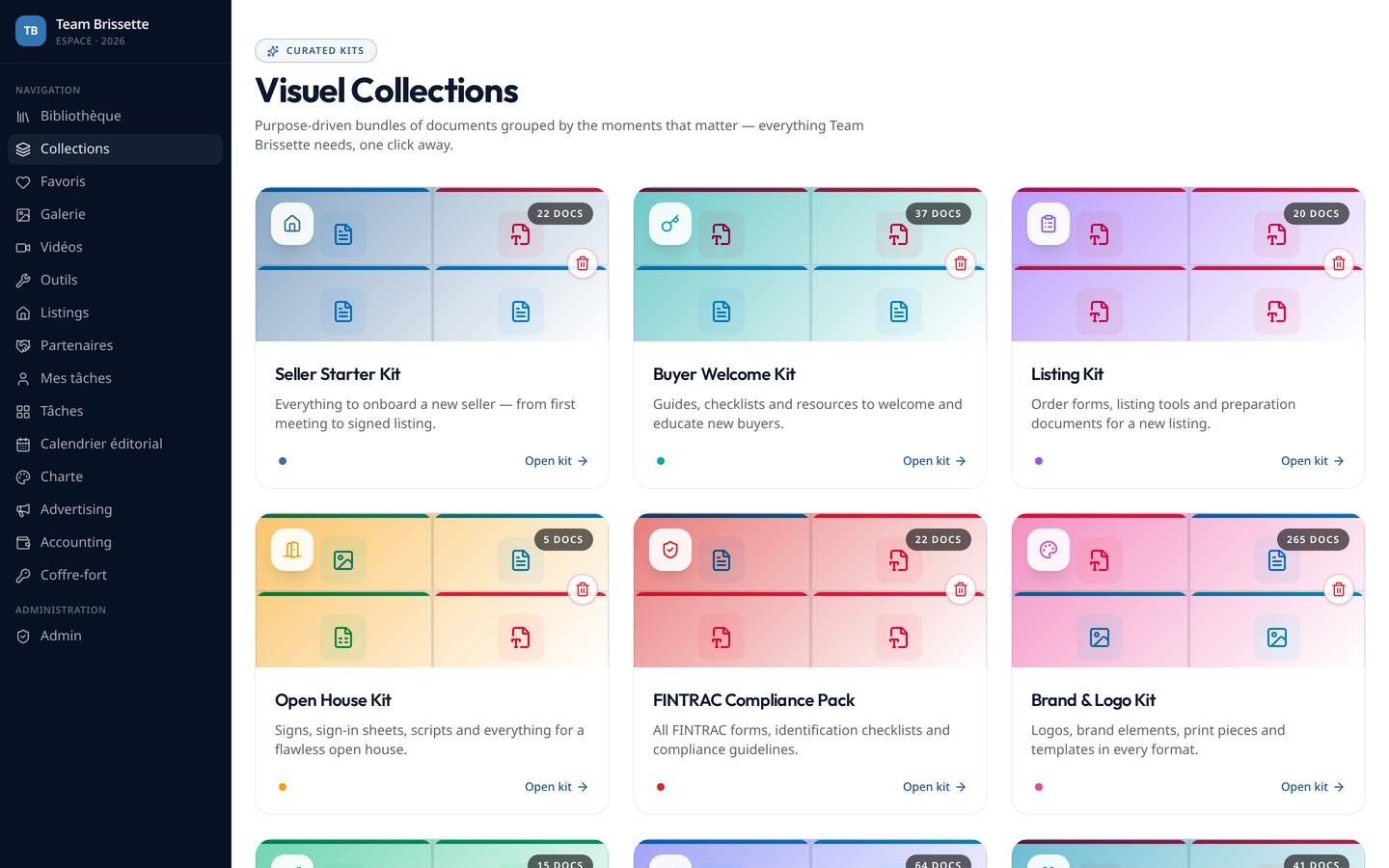
Collections — curated thematic sets that cut across the folder tree, so a workflow (listing kit, onboarding, compliance) can be assembled without moving files.
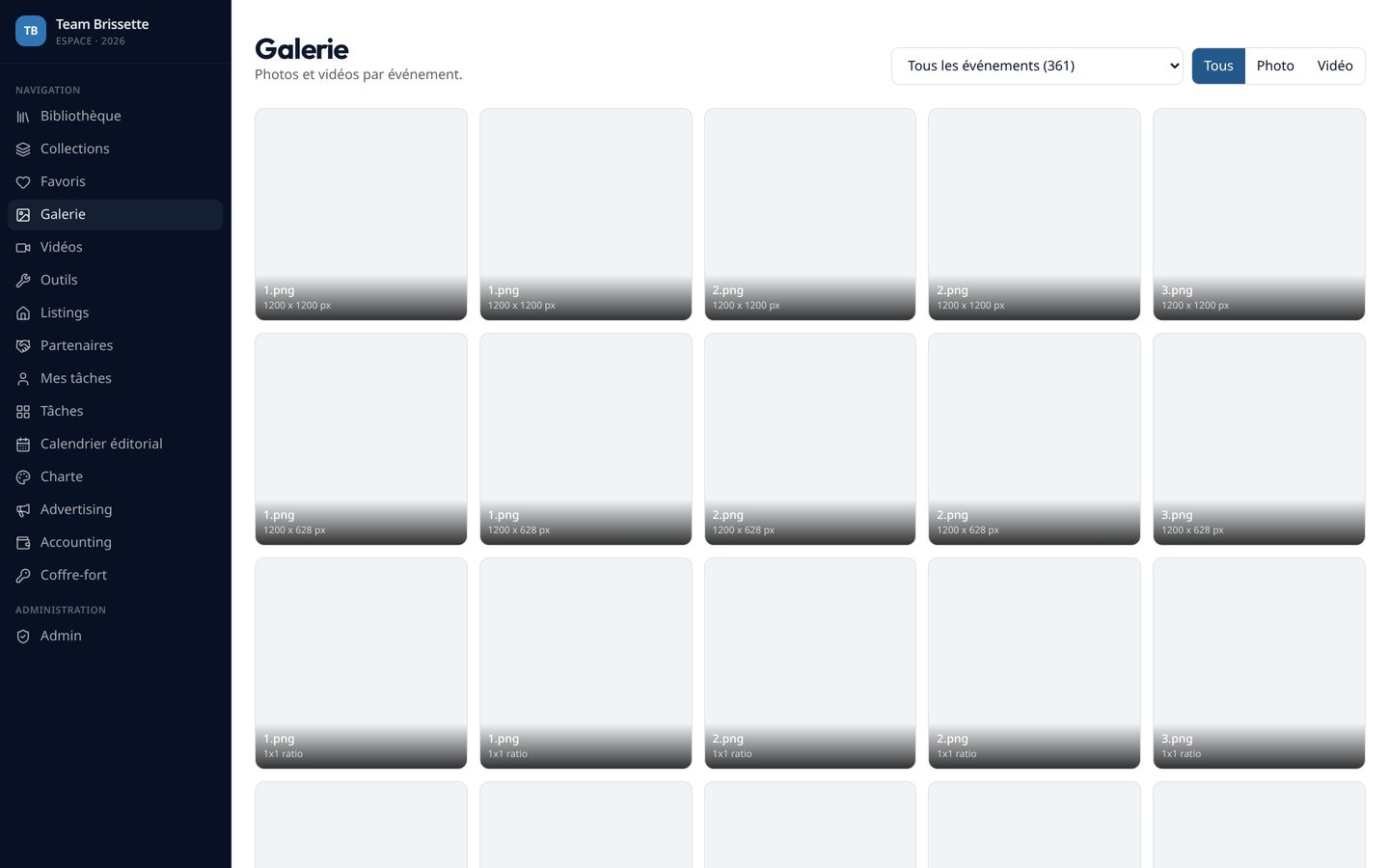
/gallery
Gallery — photo and video library filtered by event, with lightbox viewing, virtualised scrolling for large sets, batch import and deletion.
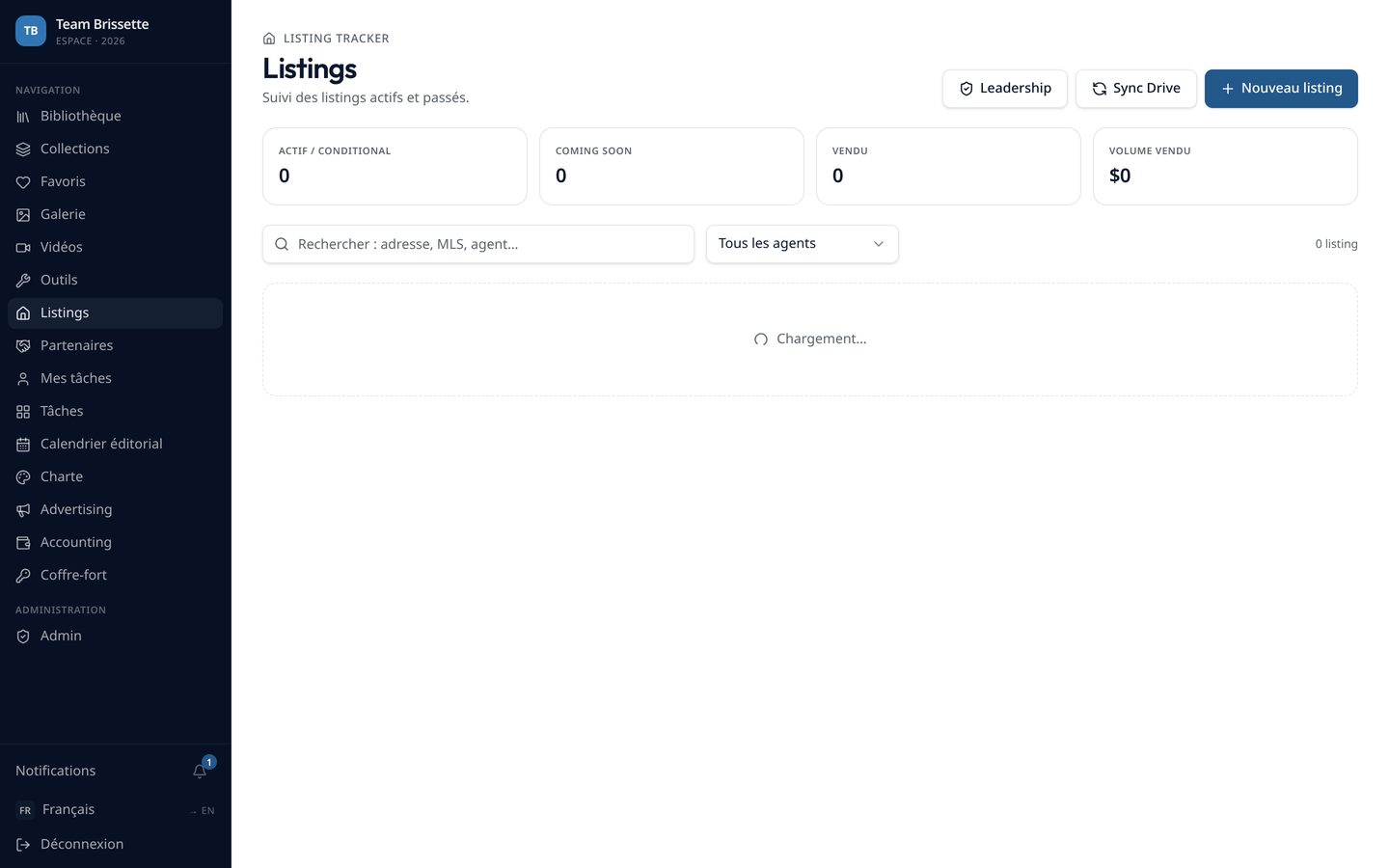
/listings
Listings — a Kanban of property states with a detail sheet per property: overview, website status and owner, linked advertising briefs, leads, photographer photos, AI photo analysis and the property-site handoff. A listing can be created from an MLS link and prefilled automatically.
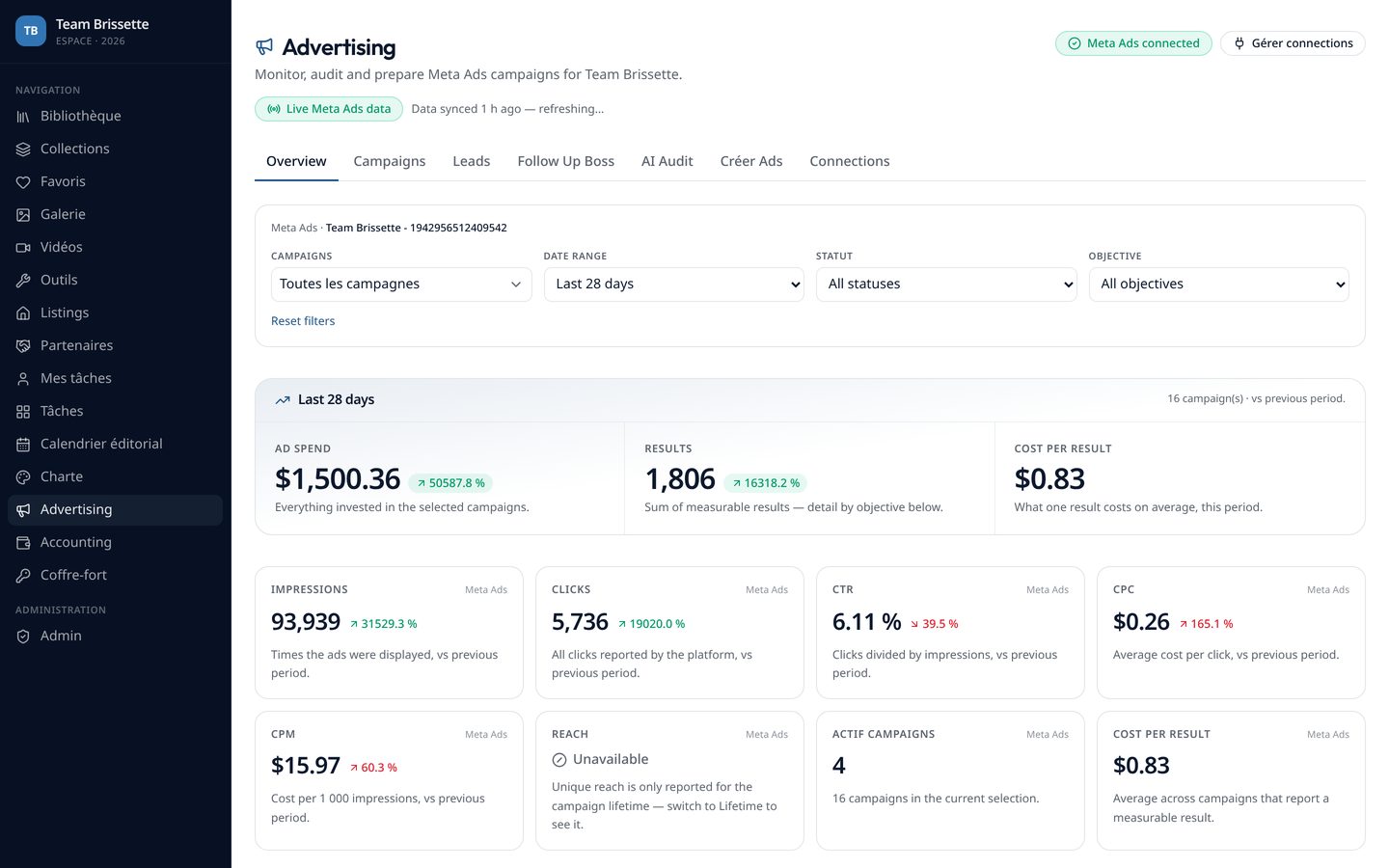
/advertising
Advertising overview — live ad-platform data with spend, results and cost per result, period-over-period deltas, impressions, clicks, CTR, CPC, CPM and reach, filtered by campaign, date range, status and objective.
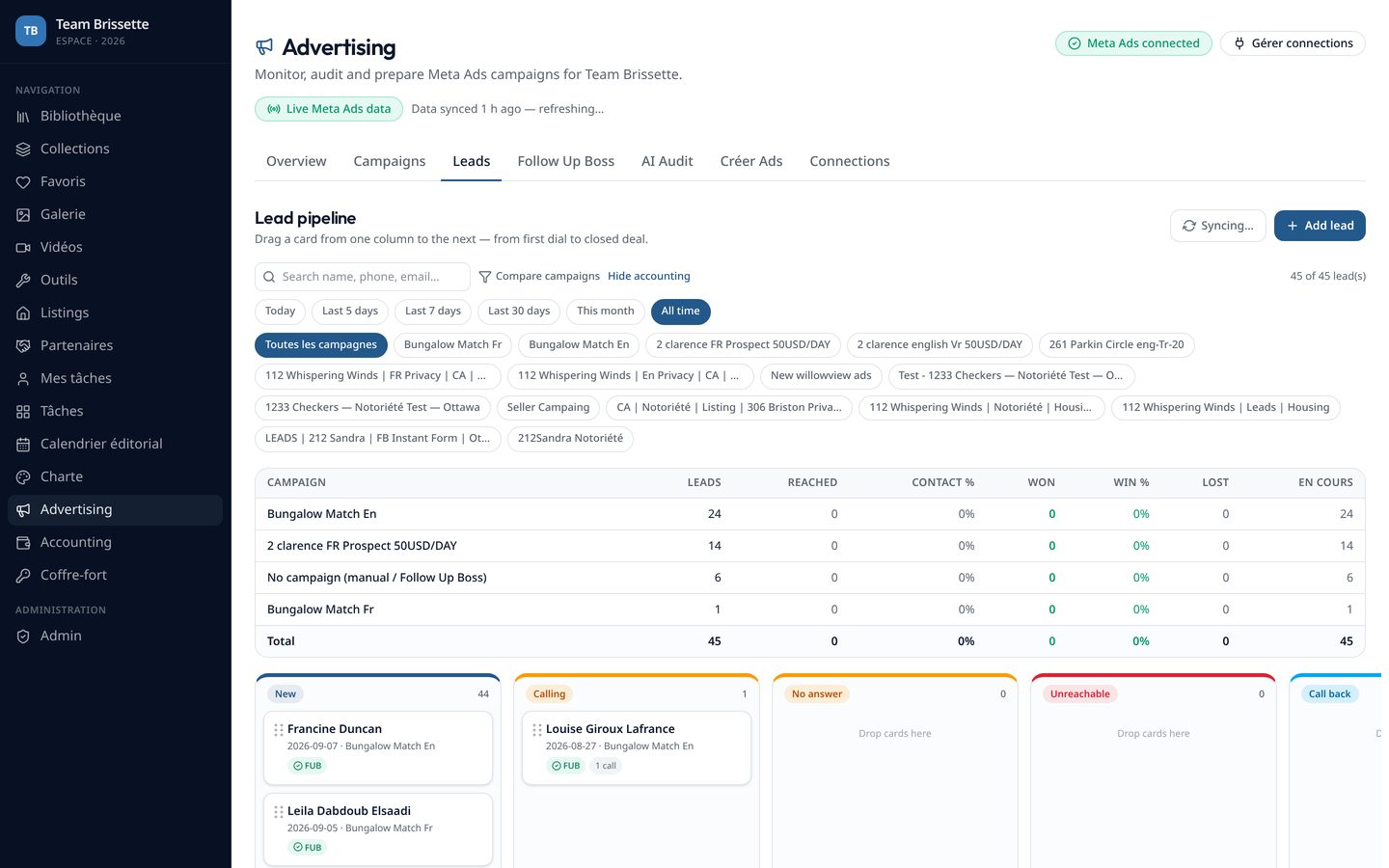
/advertising/leads
Leads — pipeline board fed automatically by ad-platform sync. Column labels are editable inline by admins and shared across the team; leads carry campaign, form and property context.
/advertising/fub
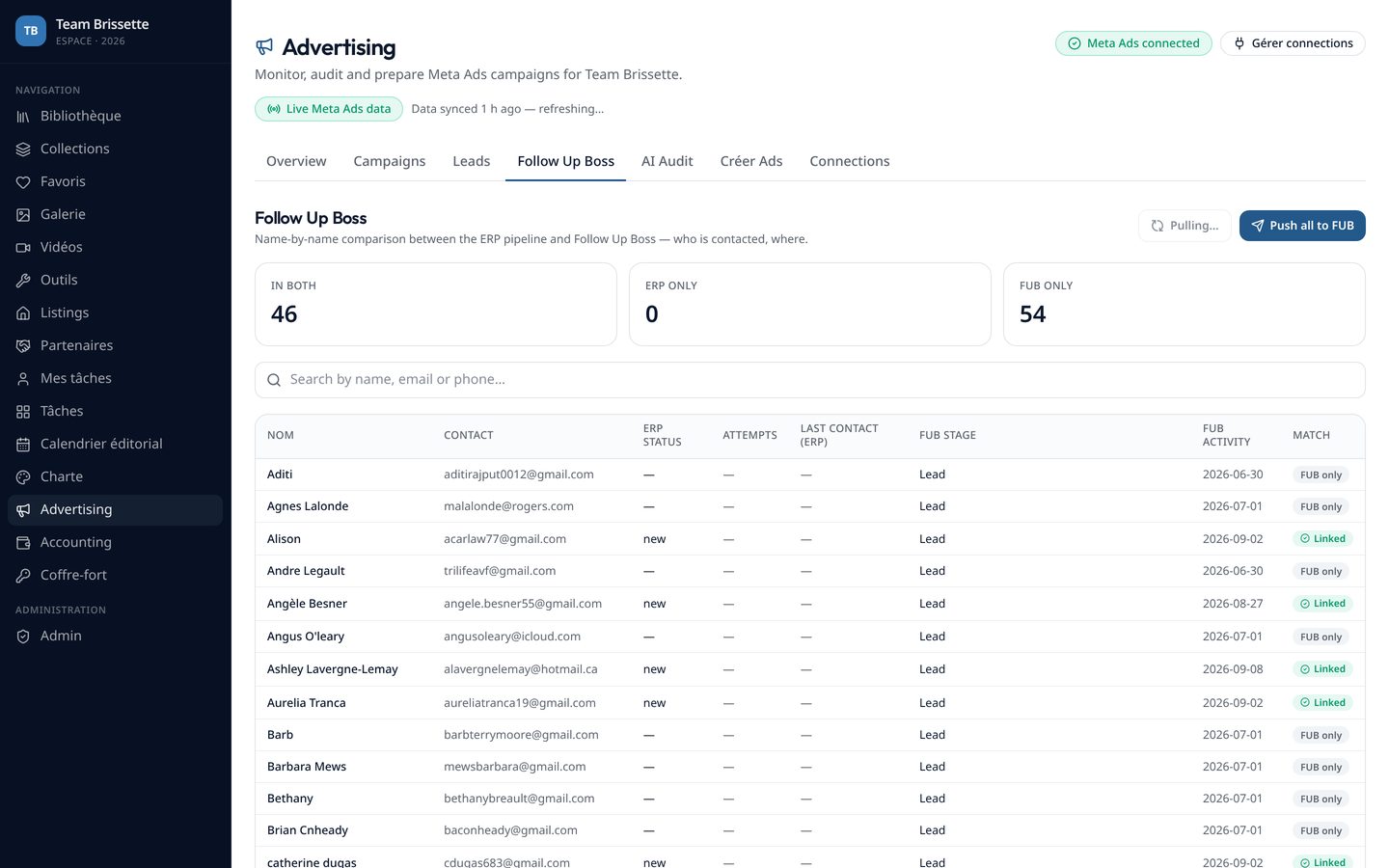
CRM reconciliation — every lead matched against the CRM by name, email and phone, so the team can see at a glance who has actually been contacted.
/advertising/create-ads
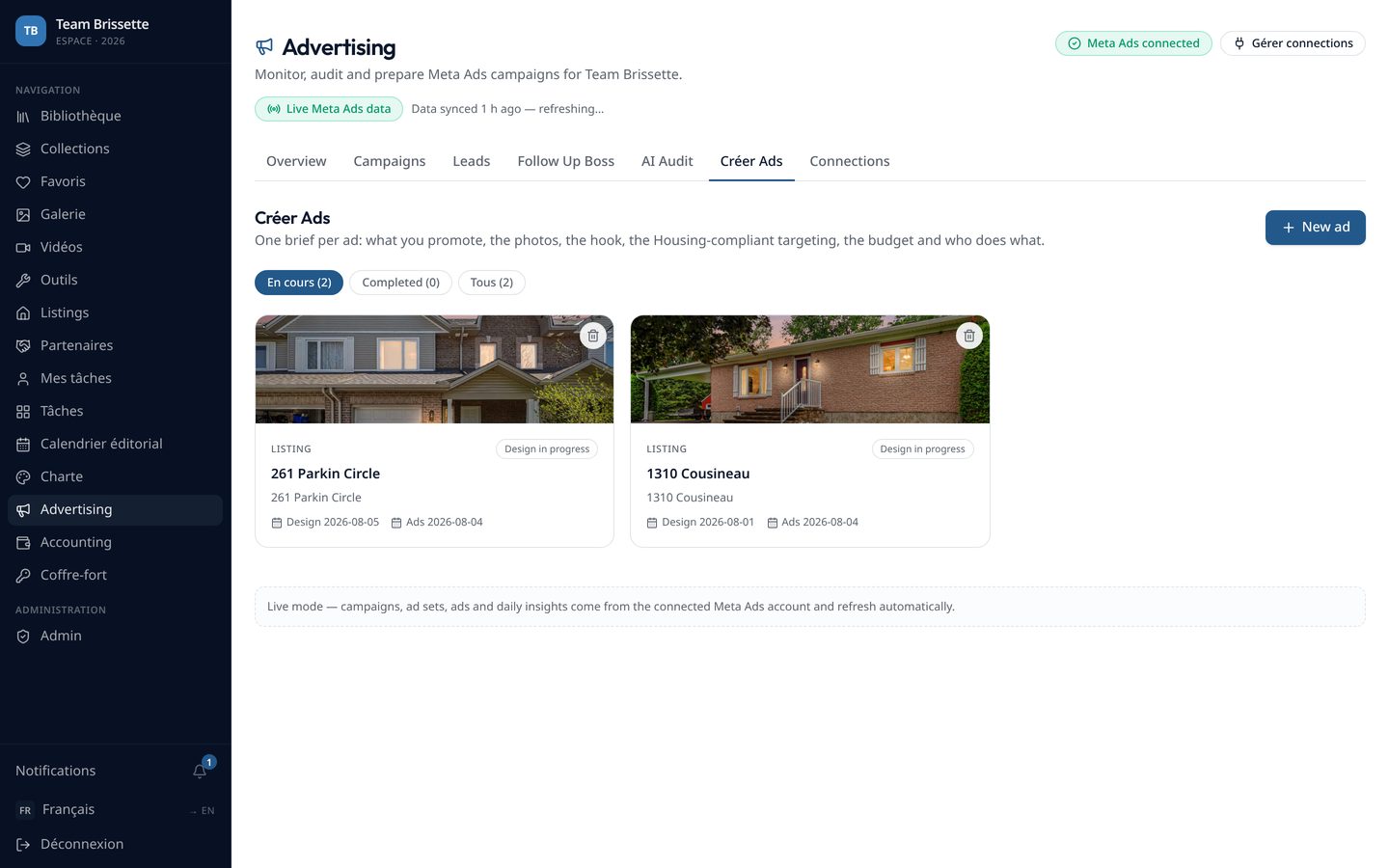
Ad creation wizard — briefs built from a listing, with photo review and human approval before anything is published.
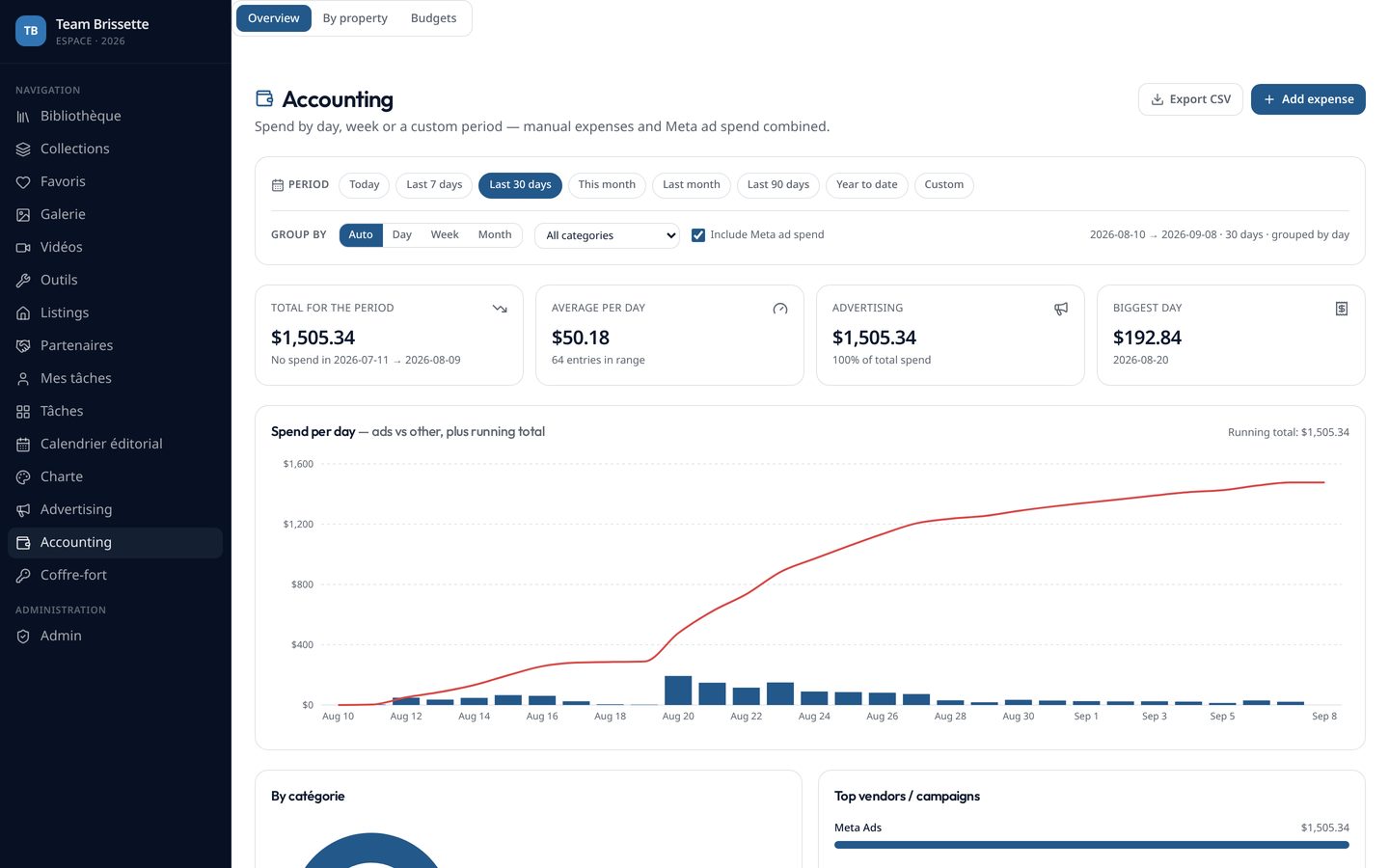
/accounting
Accounting — manual expenses alongside synced ad spend, KPI cards, cumulative spend charts and monthly budgets with variance alerts.
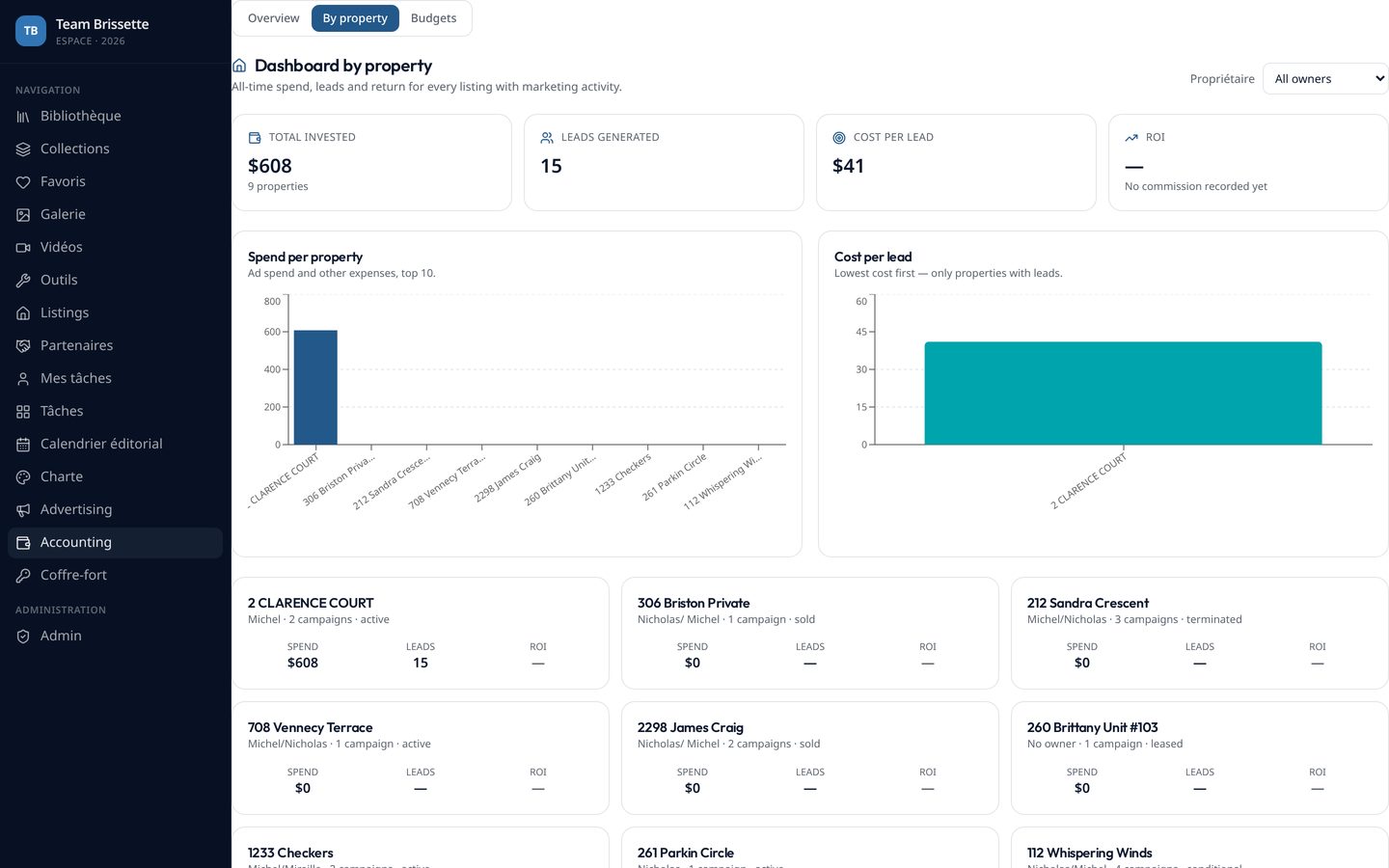
/accounting/properties
Investment per property — spend, leads, cost per lead and return brought together per listing, with owner filters and charts.
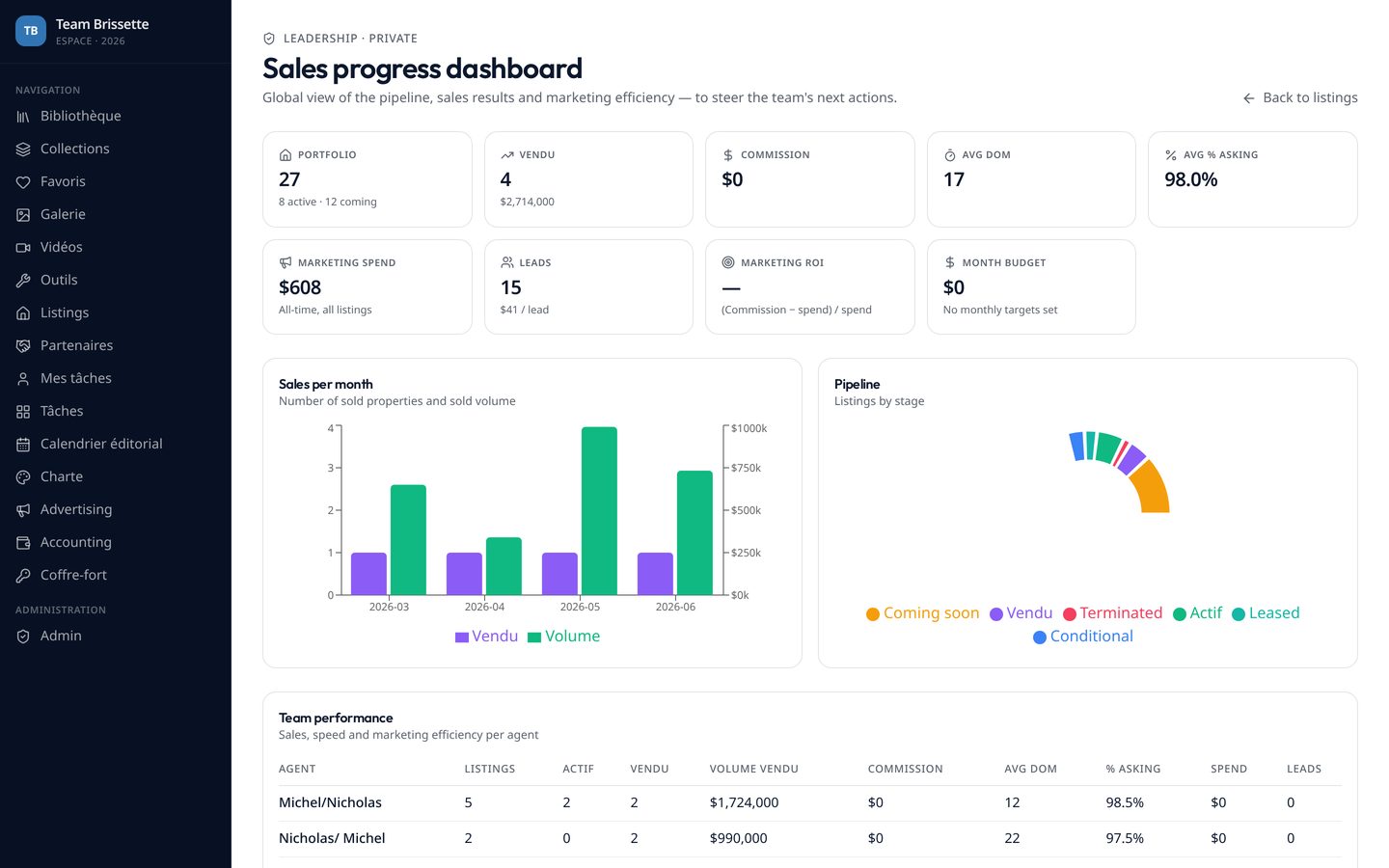
/leadership
Leadership dashboard — a role-gated route with pipeline distribution, days on market, marketing return and a property progress table.
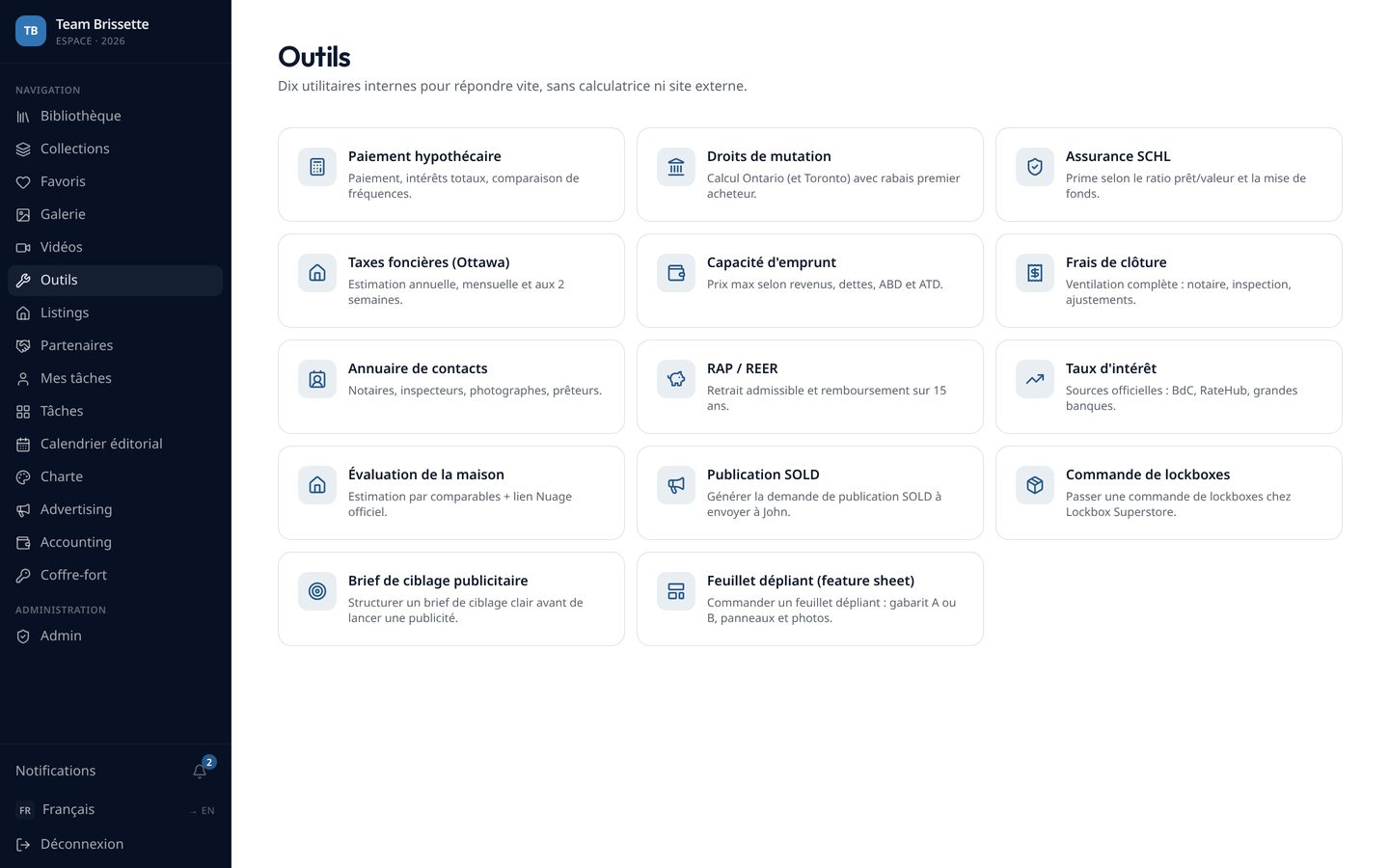
/tools
Tools hub — fifteen internal tools that replace external calculators and one-off documents, each written against Canadian and Ontario rules.
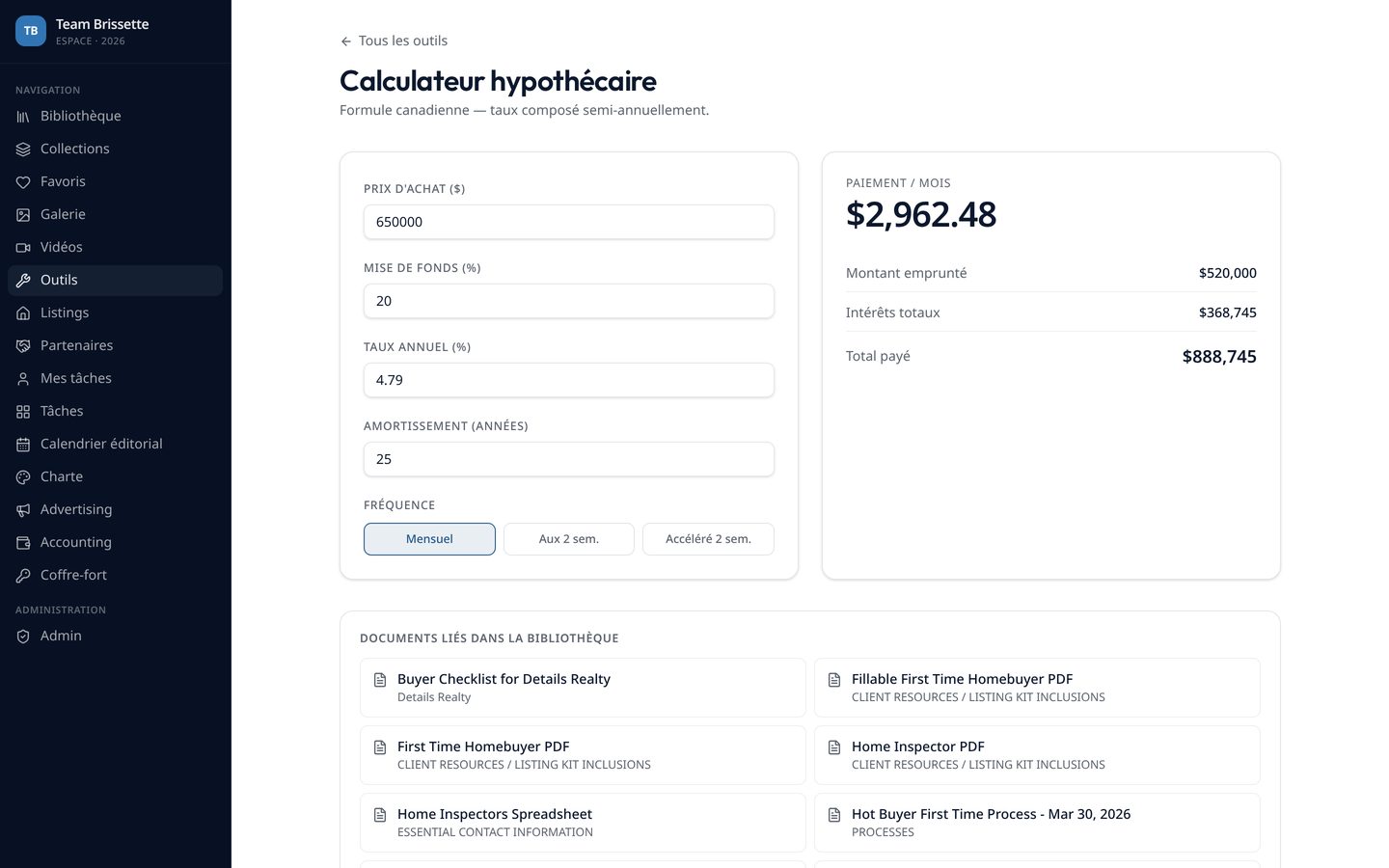
/tools/mortgage
Mortgage calculator — amortisation with payment frequency and term handling, with related library documents surfaced under every tool.
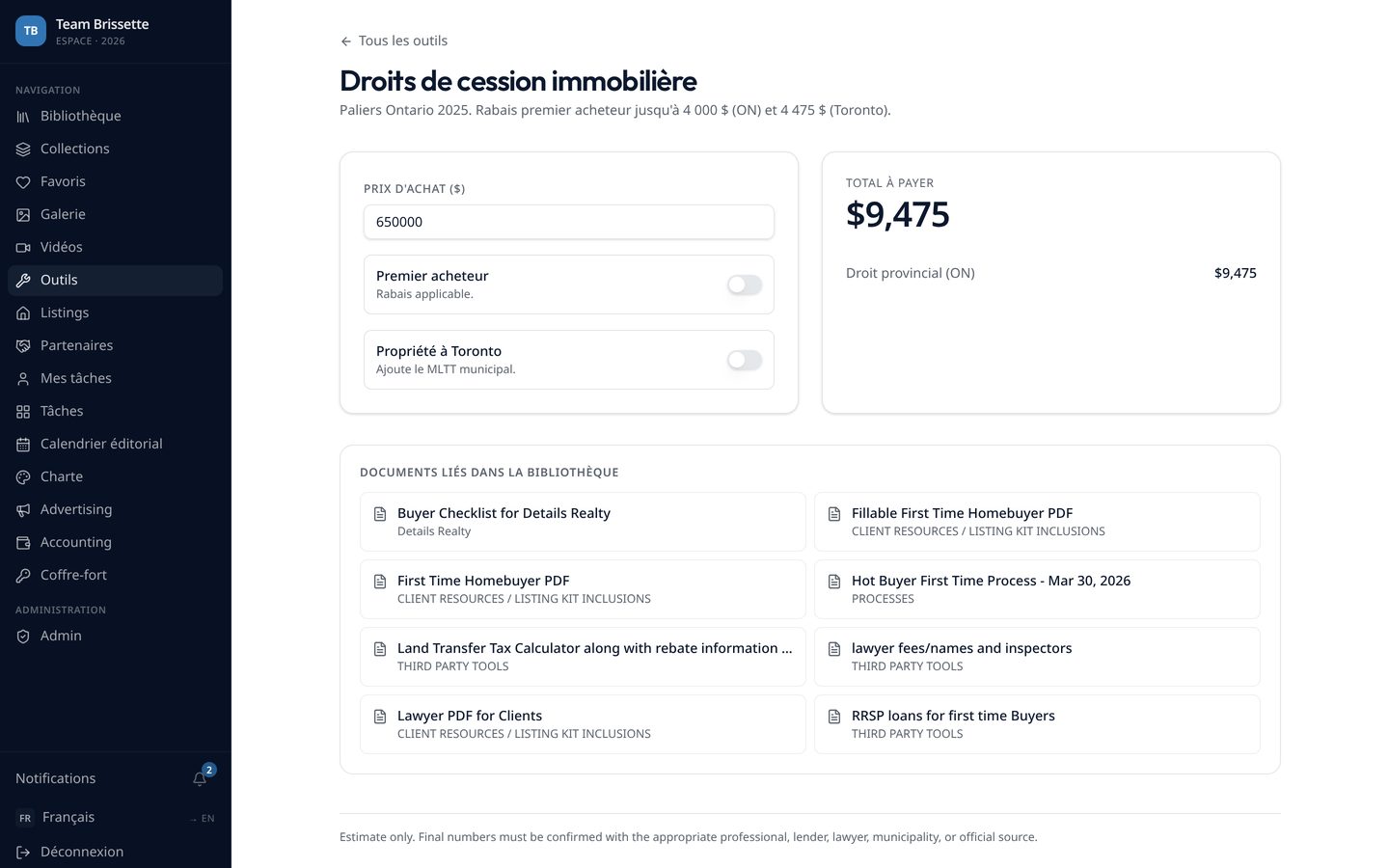
/tools/land-transfer
Land transfer tax — provincial and municipal brackets with first-time buyer rebates, kept in one constants module so a rate change is a single edit.
/tools/feature-sheet
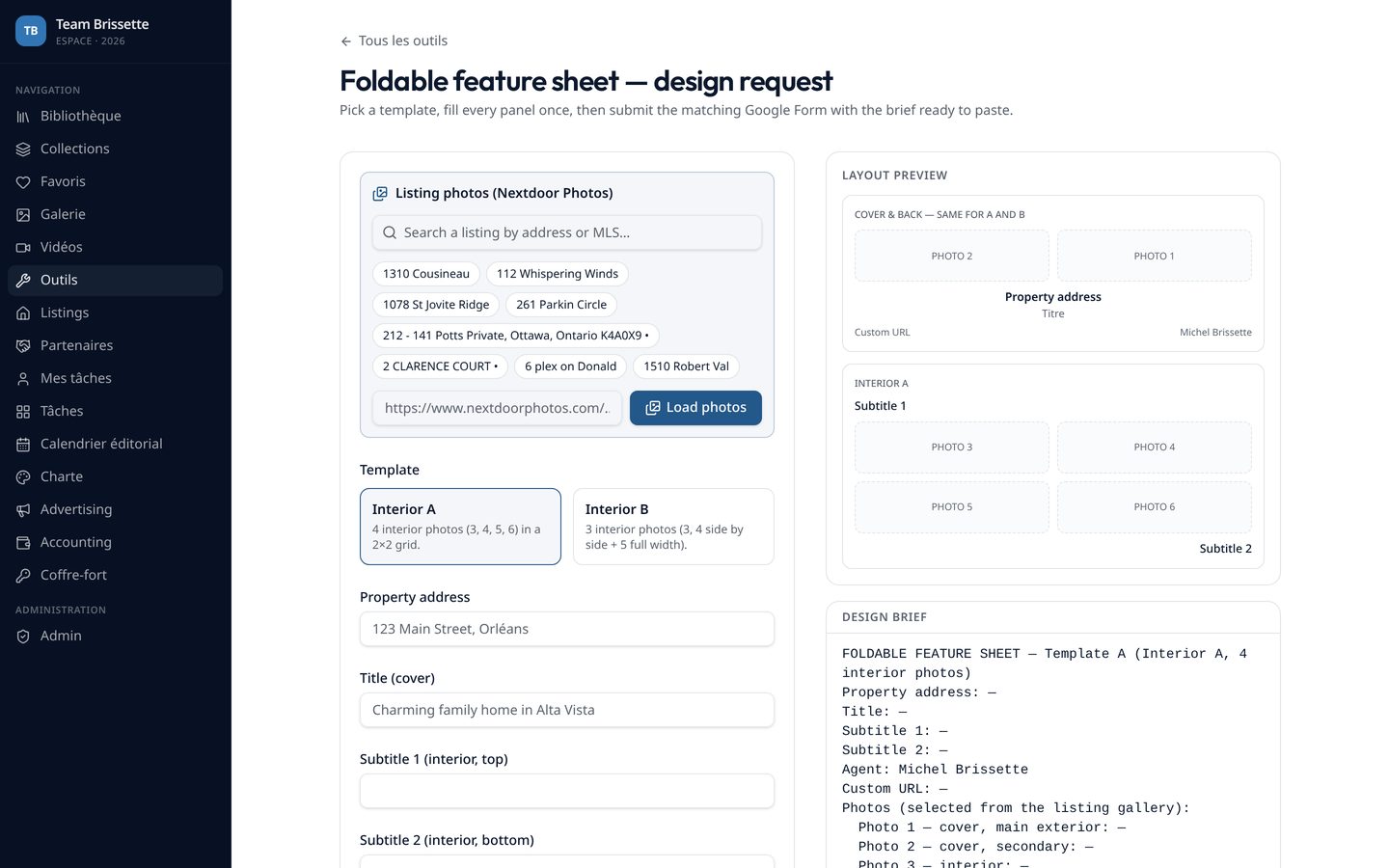
Foldable feature sheet — a printed marketing document turned into a tool: photos imported from the photographer's delivery link and assigned to template panels, exported to PDF.
/videos
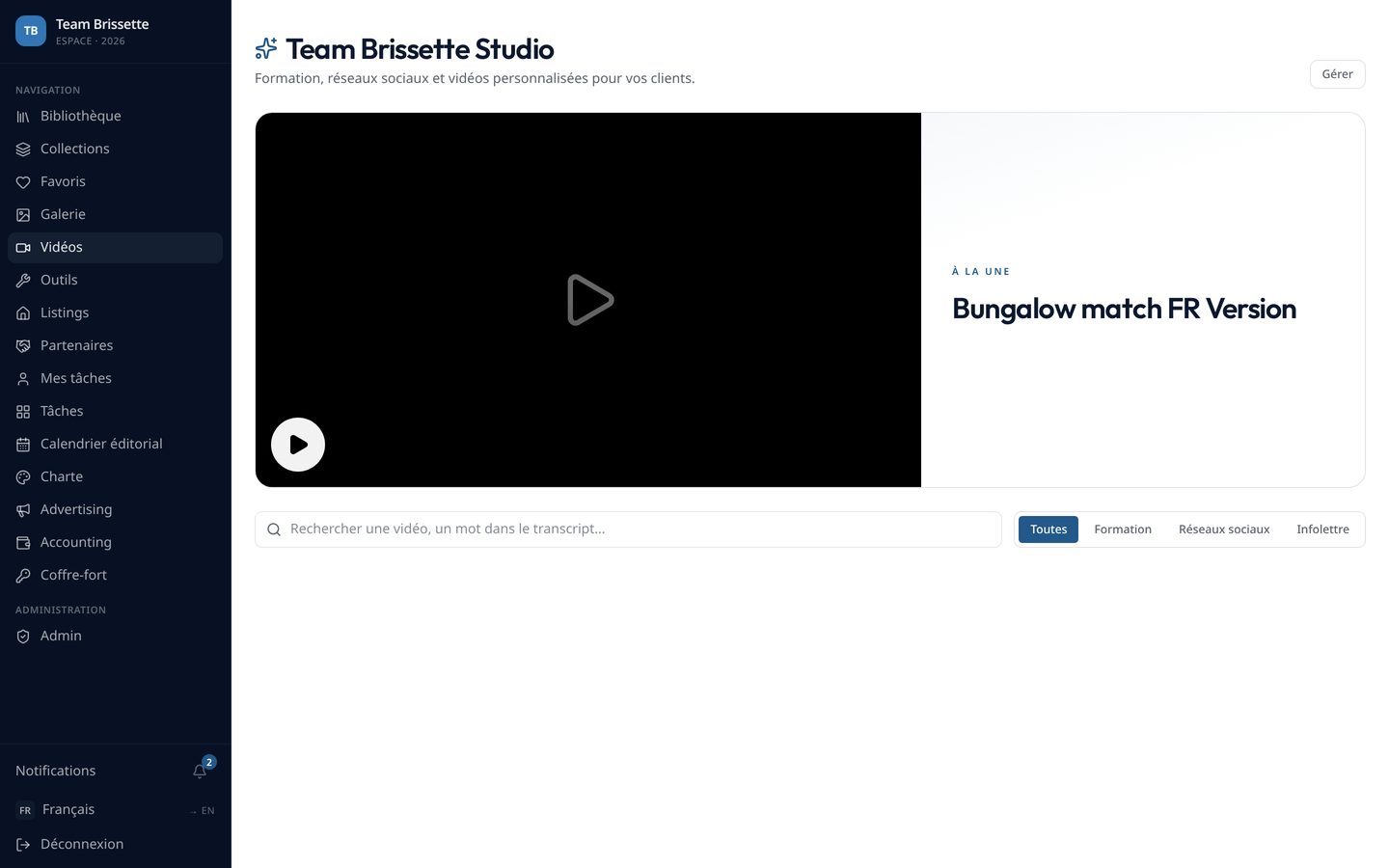
Studio — training video library with player, transcript panel, an AI question-and-answer dialog over the transcript, playlists, watch progress and personal send links.
/admin
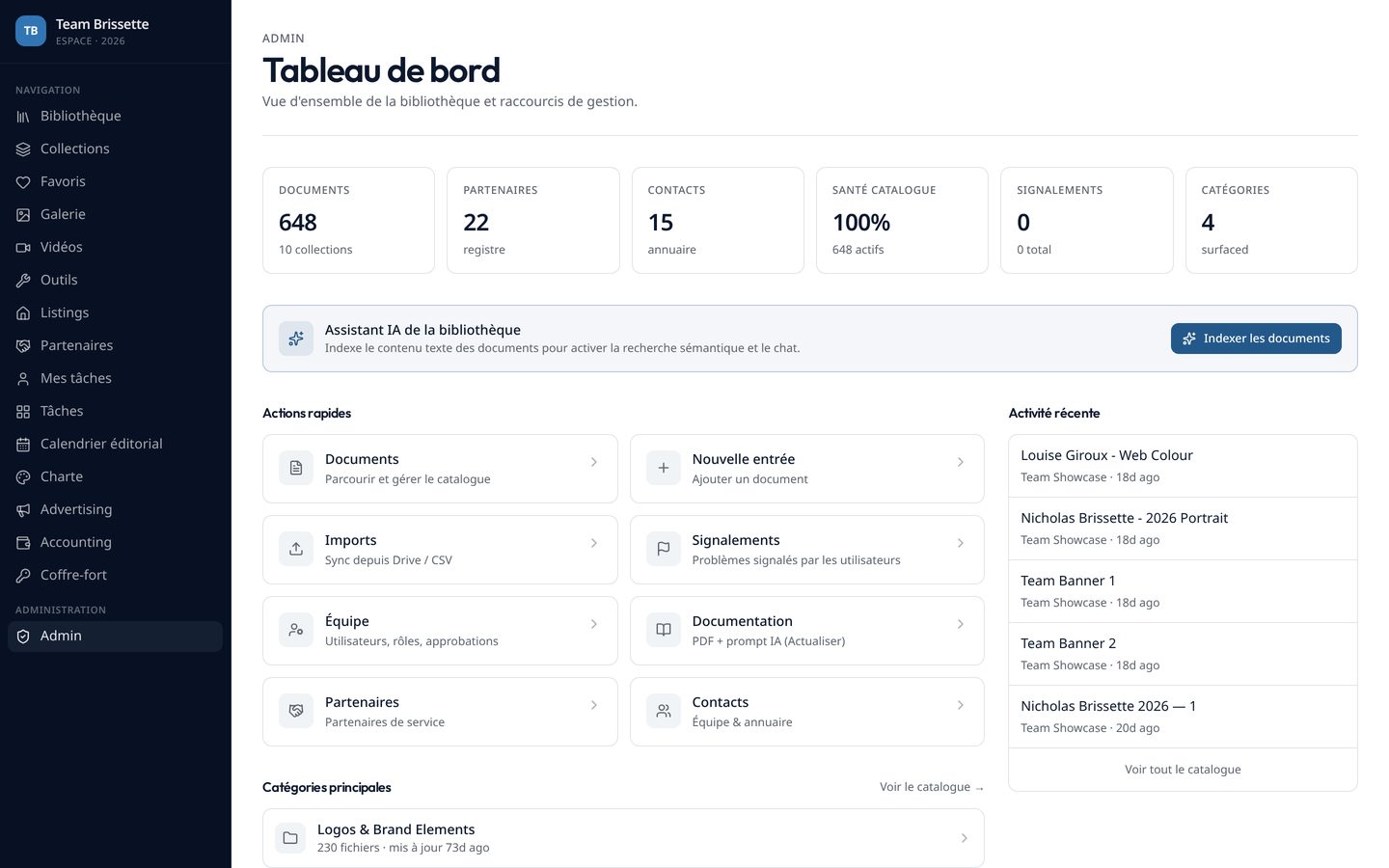
Admin — KPI dashboard, document management, imports and syncs from the two approved sources, reports, audits and generated system documentation.
/admin/tasks
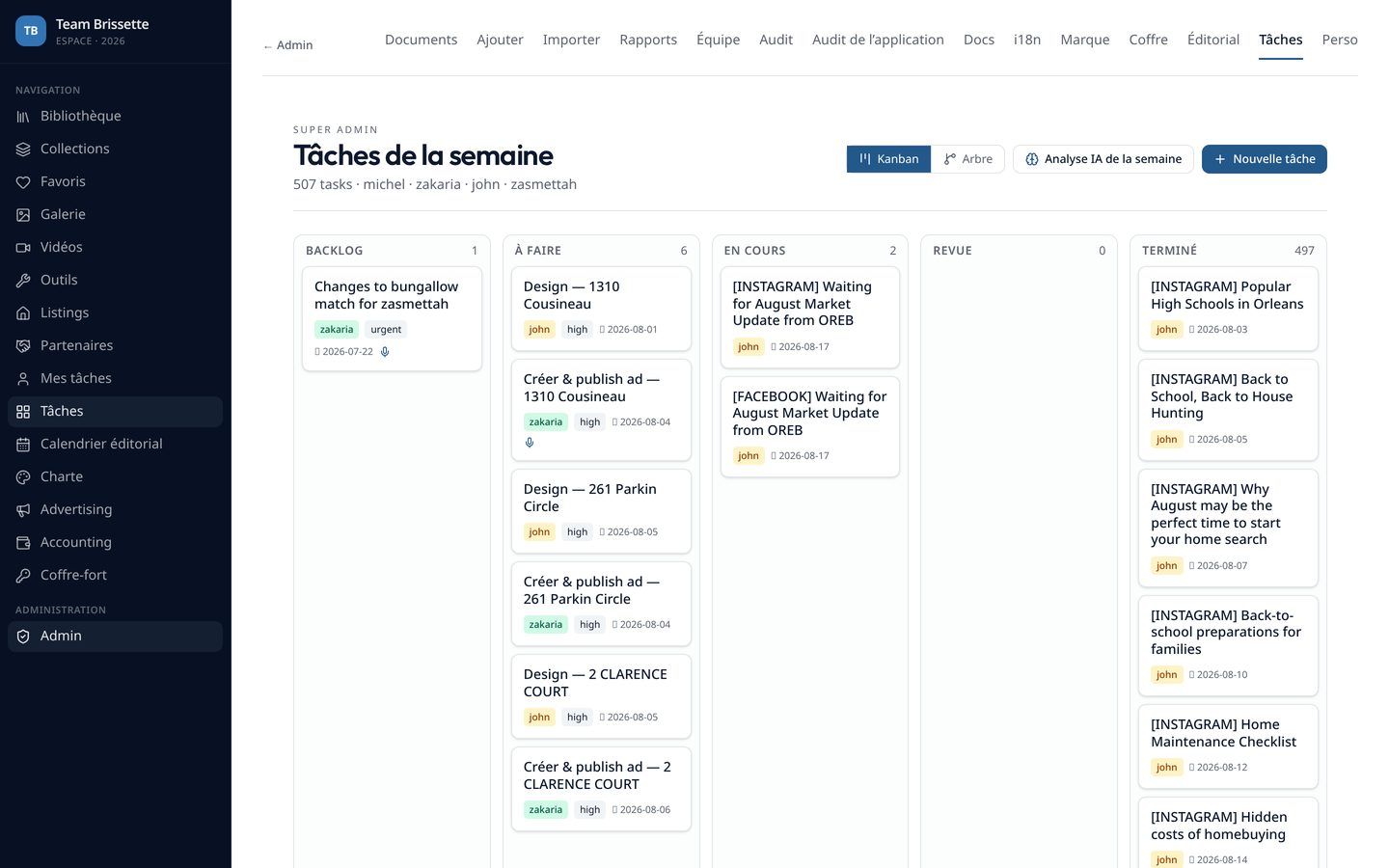
Task board — a super-admin-only Kanban with assignment, dependencies and audio notes attached to tasks.
/admin/brand
Brand hub — logos, brand assets and a credentials vault for shared third-party tool access.
/partners
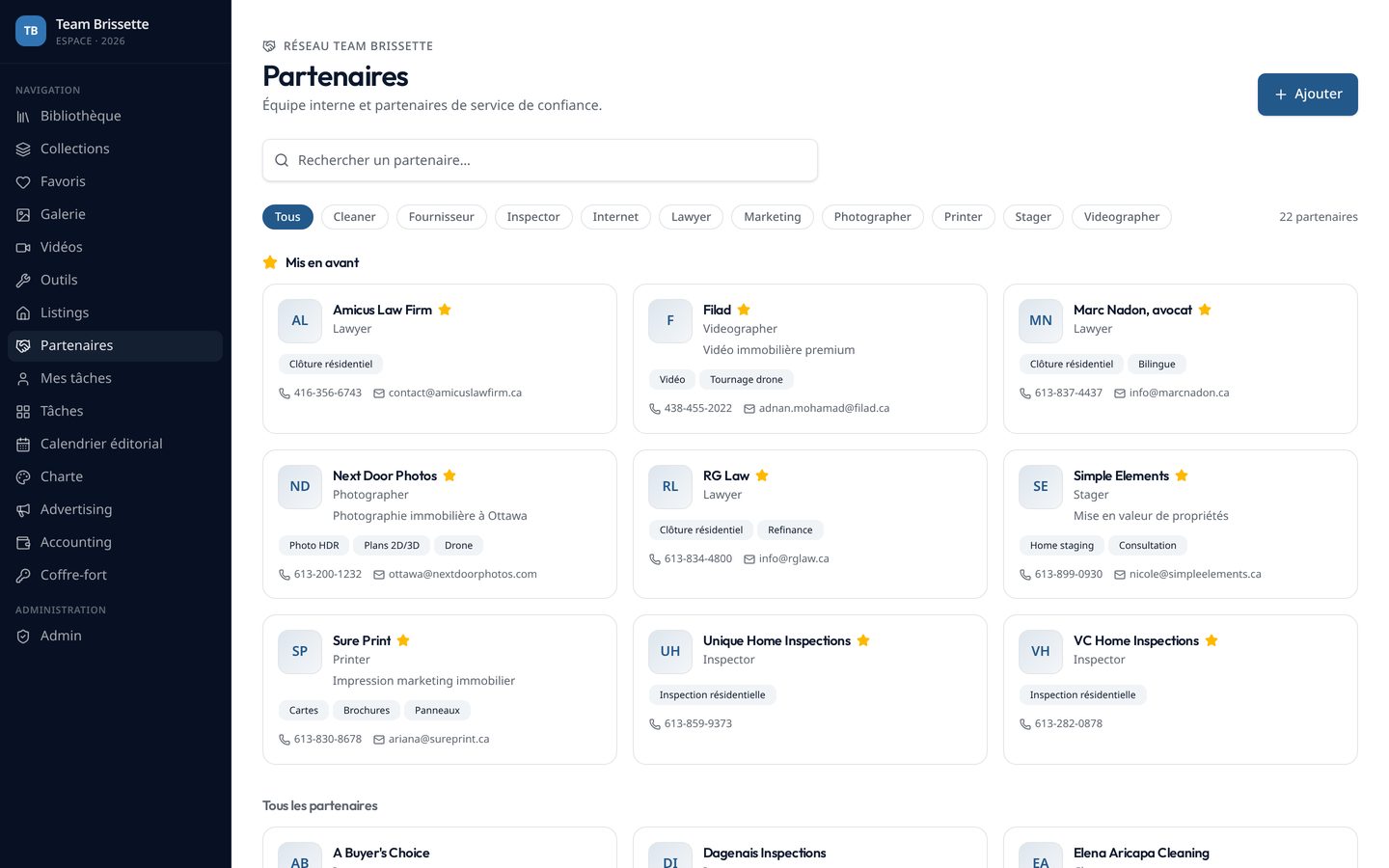
Partners — searchable directory of notaries, inspectors, photographers and suppliers with detail sheets and featured entries.

Main workflow

One property, end to end

The spine of the product: every step writes into the same record, so the last step can report on the first.

  1. 01

    Create the listing

    Paste an MLS link. The record, description and photos are extracted and prefilled instead of typed by hand.

  2. 02

    Analyse the photos

    A vision pass grades every photo, proposes keep / remove, names the hero image and the top five, and explains why.

  3. 03

    Brief the property site

    The approved selection plus marketing inputs are sent, after human validation, to the property-website project over a signed request.

  4. 04

    Build the ads

    The brief and the approved photos feed the ad wizard, so creative starts from the same source of truth.

  5. 05

    Match the spend

    Campaigns are matched back to the listing by brief name first, then by address, so every dollar lands on the right property.

  6. 06

    Work the leads

    Leads arrive on the pipeline board, are pushed to the CRM with campaign, form and answers, and notify the team by email, push, in-app and messaging.

Paid acquisition

Facebook Ads: audited, created and attributed inside the platform

The ad account is not a separate world anymore. Campaign data is pulled in, audited, reconciled against the leads it produced, and every new campaign starts from a listing that already exists in the system.

Audit first

review
Every campaign is reviewed against spend, results, cost per result, CTR, CPC, CPM and reach, with period-over-period deltas for today, yesterday, 7 / 28 / 90 days and lifetime. Campaigns that need attention are flagged rather than left to be noticed.

Reconciled numbers

data integrity
Platform lead counts are consolidated from the different lead action types and checked against daily insight totals, so the same campaign cannot show two different result figures in two places.

Created from the listing

wizard
The ad wizard starts from a property: address, brief and the AI-approved photo set are carried over, a human approves the creative selection, and the campaign name is written so it can be matched back automatically.

Attributed automatically

matching
On each sync, campaigns are matched to a listing by active brief name first, then by property address, with a manual override picker. Leads inherit the property from their campaign, which is what makes cost per property possible.
/advertising
The advertising overview: live campaign performance with deltas, spend by campaign, results by objective and a comparison between platform leads, imported leads and contacted leads.
/advertising/create-ads
Ad creation: a brief built from the listing, with photo review and explicit human approval before anything leaves the platform.
/advertising/leads
Leads land on a pipeline board with campaign, form, answers and property attached — synced silently on page load and every five minutes, with date ranges from today to all time.
/accounting/properties
The payoff: spend, leads and cost per lead per property — the question nobody could answer before now answers itself.

Orchestration

Connecting the tools the team already lived in

The hard part was never one feature. It was making a drive, a CRM, an ad account, a photographer's portal, a spreadsheet and a second web project behave like one system — with a human validating each handoff.

CRM — two-way, without webhooks

  • New leads are pushed automatically with campaign name, form name, listing address, submission date and every form answer as a structured note.
  • The CRM plan exposed no webhooks, so the integration was rebuilt in pull mode with a scheduled recurring pull and a manual control.
  • Contacts are retrieved with pagination and matched to platform leads by name, email and phone, on a dedicated comparison screen showing who was actually contacted.
  • Pipeline stages on both sides are kept aligned, and every push is logged.

Task board — the Trello the team stopped needing

  • A Kanban board with drag-and-drop columns, assignment and due dates, restricted to super admins.
  • Dependencies between tasks, so blocking work is visible instead of remembered.
  • Audio notes attached to a task, for instructions that are faster to say than to type.
  • Assignment triggers a notification through the channel the assignee chose.

Drive — from dependency to archive

  • Two approved sources only, enforced in code, with a purge tool that removes anything outside them.
  • A spreadsheet index was imported to build the folder tree, then files were copied into the platform's own private storage.
  • Documents are previewed and edited in the app — PDF, images, spreadsheets and rich text — instead of opening elsewhere.
  • The goal was explicit from day one: the drive can be switched off without losing the team's knowledge.

Property website project — signed and validated

  • A second web project receives a publication brief over an HMAC-signed, timestamped request.
  • Photos are pre-selected from the AI analysis — hero, top five, keep / remove — and a human approves before sending.
  • A signed callback returns publication status, which updates the listing and notifies the team.
  • Explicit statuses: draft, ready to send, sent, received, needs information, in progress, published, failed.

Photographer portal — into the workflow

  • Property photos are imported from the delivery link rather than downloaded and re-uploaded by hand.
  • The same set feeds the AI analysis, the ad wizard, the property site brief and the printed feature sheet.

Notifications — four channels, one preference

  • In-app realtime, browser push, email and messaging, chosen per user and per event type.
  • New leads, task assignments and property status changes each notify the right people automatically.
/advertising/fub
CRM reconciliation: platform leads matched to CRM contacts by name, email and phone, with contact history and stage on the same row.
/admin/tasks
The internal task board: columns, assignment, dependencies and audio notes — replacing an external board and the notifications that came with it.

Scope

Every module in the platform

Nine functional areas across 76 route files — each one shipped, used and reachable from the same shell.

Library

  • Folder-first browsing with breadcrumbs and per-folder counts
  • Fuzzy search across titles, categories and extracted content
  • In-app viewers: PDF, image, CSV, HTML — no redirect to the drive
  • Rich-text editor for native documents
  • Favourites, recent views, pinned items, drag-and-drop ordering
  • Report-a-document flow for outdated or broken files

Collections & Gallery

  • Thematic collections spanning multiple folders
  • Photo and video gallery with event filters and lightbox
  • Virtualised grids for hundreds of assets
  • Batch import and per-item deletion

Listings — property hub

  • Kanban across Coming Soon, Active, Conditional, Sold, Leased, Terminated
  • Create from an MLS link with automatic extraction
  • Website status and owner tracked per property
  • Linked ad briefs, spend and leads on the same sheet
  • Photographer photo import and AI analysis
  • Signed handoff to the property-website project

Advertising

  • Live campaign metrics with today → lifetime ranges and deltas
  • Campaign, status and objective filters
  • Ad creation wizard with photo review and approval
  • AI audit of campaign setup
  • Leads board with editable, team-shared column labels
  • Platform connections management

Accounting

  • Manual expenses plus automatically synced ad spend
  • KPI cards and cumulative spend charts
  • Investment, leads and return per property
  • Monthly budgets with pacing and variance alerts

Tools hub

  • Fifteen calculators and workflows for the Canadian market
  • Shared constants module so a rate change is one edit
  • Related library documents surfaced inside each tool
  • Copyable briefs and PDF export where relevant

Studio & training

  • Video library with multi-provider playback
  • Transcript panel and AI Q&A over the transcript
  • Playlists, watch progress and campaign stages
  • Personal send links with tokenised public viewing

Leadership

  • Role-gated route, not a hidden link
  • Sales volume and pipeline distribution
  • Days on market and marketing return
  • Property progress table for team follow-up

Admin back office

  • KPI dashboard and document management
  • Imports and syncs restricted to two approved sources
  • Brand hub, credentials vault, editorial calendar
  • Super-admin task board with dependencies and audio notes
  • Team management and invitations
  • Security, application and translation audits
  • Self-generating system documentation (human PDF + AI prompt)

Detail

The fifteen internal tools

Each replaces an external calculator, a PDF or a message to someone who knows the answer.

Mortgage calculator

Payment, amortisation, frequency and term.

Land transfer tax

Provincial and municipal brackets, first-time buyer rebates.

Mortgage insurance

Premium by down-payment band on the insured amount.

Property tax

Municipal rate applied to assessed value.

Affordability

Debt-service ratios turned into a maximum price.

Closing costs

Itemised estimate with editable defaults.

RRSP / HBP

Home Buyers' Plan withdrawal and repayment schedule.

Rates

Reference rate board for client conversations.

Home evaluation

Structured evaluation request and summary.

Contacts finder

Internal rolodex with synonym-aware scoring and CSV import.

SOLD post order

Turns a procedure document into a guided request.

Lockbox order

Supplier ordering workflow as a form, not a PDF.

Ads targeting brief

Forces the four targeting essentials before a launch.

Foldable feature sheet

Photo-to-panel builder with PDF export.

Partners directory

Vetted suppliers with detail sheets and search.

Intelligence

Where AI earns its place

AI is used where a human would otherwise spend an hour on judgement work — always with a person approving the output before it leaves the platform.

Listing photo strategist

vision
A structured, multi-step review of every listing photo: technical quality, staging, buyer appeal, keep or remove, hero selection, top five ordering and a written rationale. The result is reused downstream by the property-site brief and the ad wizard instead of being re-decided each time.

Library assistant

semantic search
Natural-language questions answered against the document catalogue, returning the actual documents rather than a generated summary the team cannot verify.

Landing page analysis

vision + text
Reads a property page and proposes marketing hooks and angles for the campaign brief.

Video Q&A

transcript
Ask a training video a question and get the answer with its place in the transcript.

MLS extraction

structured output
A listing link is parsed into typed fields and photos, with the agent correcting rather than typing.

Campaign audit

review
Flags campaigns whose setup, spend or results need attention before money keeps running.

Integrations

Four external systems, all two-way where it matters

Ad platform

pull + reconcile
Campaigns, ad sets, creatives, daily insights and leads are pulled on a schedule and on demand. Rate limiting forced a redesign: requests were consolidated to the campaign level, filtered by last successful sync, capped per run and bounded by both a server deadline and a client timeout, so the interface never spins forever. Lead totals are reconciled against daily insight sums to remove double-counted action types.

CRM

push + pull
The provider offered no webhooks on this account, so the integration runs in pull mode with pagination. New leads are pushed automatically with campaign name, form name, property address, submission date and every form answer as a structured note — not just a name and an email.

Property website project

signed, two-way
A separate application receives briefs over HMAC-SHA256 signed requests with timestamps and a correlation id, and calls back into a public endpoint with publication status. States run draft → ready to send → sent → received → needs information → in progress → published / failed, with a human validating before each send.

Document source

read-only, fenced
Import and sync are hard-restricted to one approved shared drive and one approved sheet. Any file outside that boundary is rejected at the server function and can be purged by an admin tool — the guardrail is code, not a convention.

Architecture

How it is built

Front end

TanStack Start v1 with React 19 and server-side rendering, file-based routing, TanStack Query for data, Tailwind CSS v4 with semantic design tokens, shadcn/ui and Radix primitives, Framer Motion, dnd-kit for reordering, Fuse.js for search, Tiptap for editing, Recharts for dashboards and jsPDF for exports.

Back end

225 typed server functions across 33 modules, executed on Cloudflare Workers. PostgreSQL with 48 tables and 59 tracked migrations. Object storage for the document cache, served through signed URLs. Four public endpoints for webhooks and external callers, separated from the authenticated surface by route prefix.

Cross-cutting

Bilingual EN/FR with 414 translation keys plus a translation audit page; four notification channels (in-app realtime, browser push, email, messaging) with per-user preferences; audit logging; error capture; and a documentation generator that emits both a human PDF and an AI-readable prompt from the live schema.

Data model — 48 tables

documents · document_content · document_reports · collections · collection_documents · folder_settings · favorites · recent_views · listings · listing_budgets · listing_photo_analyses · listing_spotlight_briefs · spotlight_settings · ad_campaigns · ad_sets · ad_creatives · ad_briefs · ad_daily_insights · ad_leads · ad_lead_calls · ad_platform_connections · lead_status_labels · fub_sync_log · expenses · videos · video_playlists · video_playlist_items · video_campaigns · video_campaign_stages · video_campaign_clients · video_personal_sends · video_watch_progress · tasks · task_dependencies · task_audio · editorial_posts · editorial_visuals · editorial_comments · brand_assets · brand_credentials · partners · contacts · profiles · user_roles · team_invitations · notifications · notification_preferences · push_subscriptions · admin_audit_log

Engineering decisions

  • Server functions are the only write path; the browser never holds a privileged key.
  • Reads go through route loaders and suspense queries, so a page arrives with data rather than a spinner cascade.
  • External calls are bounded — timeouts, caps and deadlines — because a third-party slowdown must not become an unusable screen.
  • Every colour, shadow and radius is a semantic token, so both themes and the editorial light style stay consistent across 72 components.

Security

Access control taken seriously

Roles in their own table

Roles live in a dedicated user_roles table — never on the profile record — and are evaluated by a SECURITY DEFINER function so policies can call it without recursion or privilege escalation.

RLS on every table

Row-level security is enabled on all public tables with explicit grants per role. Nothing is readable by default.

Protected server functions

Authenticated middleware attaches and verifies the bearer token; protected routes sit behind a route-level gate, so no protected loader can run during prerender.

Signed webhooks

Inbound and outbound integration traffic is HMAC-signed with timestamps; public endpoints verify the caller before touching data.

Built-in audits

The platform audits itself: an application audit page checks structural invariants, a security audit surfaces policy and grant gaps, a translation audit finds untranslated strings, and a purge tool removes any document that falls outside the approved source.

Details

The small things that make it feel finished

Most of the work is invisible until it is missing.

Editable pipeline labels

Admins rename lead columns inline; the change is stored and shared with the whole team instantly.

Bilingual by construction

414 keys, a language provider, a live DOM translator for legacy strings and an audit page listing what is still untranslated.

Automatic attribution

Campaigns are matched to properties by brief name, then address — with a manual override picker when the fuzzy match is wrong.

Bounded waits

Long syncs surface a clear pending state and keep existing data on screen, whatever the upstream platform is doing.

Realtime that scales

Notification channels are isolated per mount, so live updates stay reliable across navigation.

Deletion everywhere

Documents, collections, gallery items, videos, listings, partners and admin records all have guarded delete with confirmation.

Self-documenting

A generator reads the live schema and modules and emits both a human PDF and a prompt an AI can use to work on the codebase.

Empty and explained states

Dashboards explain what a metric means and why it may be unavailable, instead of showing a blank card.

Signed private files

The document bucket is not public; access is granted through short-lived signed URLs only.

My role

From the idea to the finished product

Organisation

Turned scattered practice into structure: the folder taxonomy, the naming, the property lifecycle, the pipeline stages and the rules that keep them true.

Web development

Sole builder — interface design, front end, database schema and migrations, server functions, storage, security model, bilingual content and deployment.

Orchestration

Made the ad platform, the CRM, the drive, the photographer portal and a second web project talk to each other, with a human validating each handoff.

Lead & business development

Built the acquisition chain end to end: campaign audit, ad creation from a listing, automatic attribution, lead capture, CRM push and cost per property.

Method

Shipped iteratively against real usage — each module was validated in production before the next one started, and several were rebuilt after that feedback: the library navigation, the advertising overview and the listing sheet were each redesigned once.